
You found the bricks. Maybe it's a bag in the back of a closet, maybe it's a half-built thing your kid abandoned in 2019. You point your phone at it, hit search, and get… nothing. Or worse — three confident matches, all wrong.
Here's the thing nobody tells you: it's almost never the set that's the problem. It's the angle.
Image recognition doesn't see "a cool spaceship." It sees shapes, colors, and — if it's lucky — a couple of standout parts it can lock onto. Show it the wrong side and you've hidden every clue. Show it the right side and it nails the thing in half a second. So let's shoot bricks the way the software actually wants to see them.
🎬 Watch it in 30 seconds: the whole technique, in motion (embed here once the /guides section supports video)
Why one photo fails
Every set has a few features that make it unmistakable: a printed tile, a weirdly specific curved piece, a color combo you don't see anywhere else. Recognition leans hard on those.
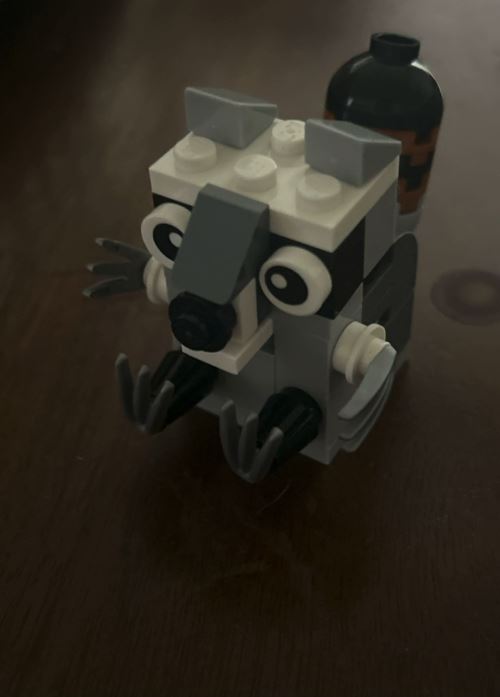
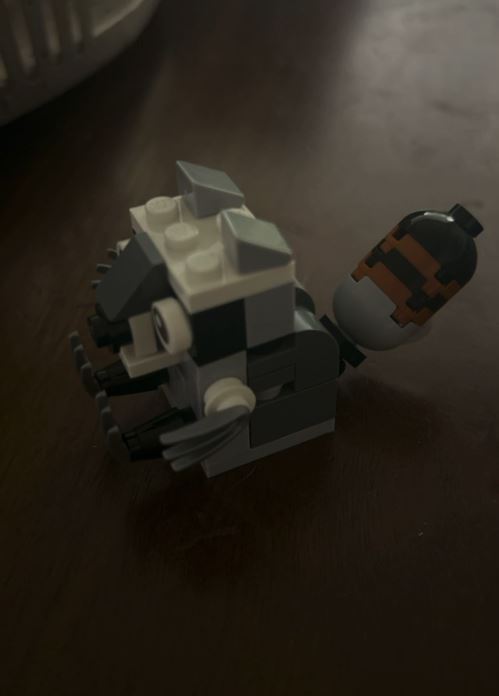 Same little guy, two angles — and each one hands the software completely different clues. (Also note: dark table, dim light. Great character shots; tough ID shots. More on that below.)
The catch is that those tells live on specific surfaces. Photograph the plain grey underside of a build and you've handed the software a grey rectangle. Technically accurate. Completely useless.
That's why a second angle so often succeeds where the first flopped. You didn't find a better set. You finally showed it the good side.
The four shots worth taking
You won't need all four. But when a set is being stubborn, work down this list — one of them almost always breaks the tie.
1. The studs-up hero shot. Straight down or at a gentle 3/4 angle, studs facing the camera, the whole thing filling the frame. This is your default. Nine times out of ten it's the only one you need. Start here.
2. The printed-part close-up. Got a tile with art on it — a dashboard, a logo, a little painted window? Get in tight on that. Printed parts are gold, because they're often unique to one set. A single good close-up of a printed piece can do what ten wide shots can't.
3. The weird-part angle. Every builder knows the piece. The one that made you go "huh, never seen that before" when you opened the bag. A big canopy, an odd bracket, a wheel that's clearly from something specific. Frame that part cleanly. Rare geometry is a fingerprint.
4. The silhouette. When color's the story — a set that's mostly one bold shade, or a shape that reads instantly from the side — shoot it against a plain background so the outline pops. Sometimes the shape is the answer.
Four habits that make every shot better
The angle gets you most of the way. These get you the rest:
- Fill the frame. A brick lost in a sea of carpet gives the software nothing to grab. Get close.
- Kill the glare. ABS plastic is shiny, and a hotspot of reflected light erases detail underneath it. Turn slightly, or move the lamp, until the surface reads clean.
- Plain background. A single-color surface — a table, a sheet of paper, a cutting mat — lets the set stand out instead of blending into your kitchen.
- Soft, even light. Window light beats a harsh overhead bulb. Shadows hide the exact details you're trying to show off.
None of this is fussy photography. It's ten extra seconds of turning the thing toward the light.
When it still won't match
Sometimes you've done everything right and the set just won't come up. Before you burn through twenty more photos, know that it might not be your fault at all — it usually comes down to one of three things:
It's an off-brand set — Pantasy, Wange, ZHEGAO, and the rest — and most identification tools only really know LEGO. Cross-brand is the whole reason BrikSnap exists, so we catch a lot that others miss.
Or we simply don't have it yet. Here's the honest part: no catalog on earth has every set, and ours is still growing. If you've reshot from a few good angles and it's still nothing, the set may just not be in our data yet — that's on us, not you, and no number of retries will conjure it up. So don't keep hammering the same photo. It's worth knowing when to stop.
When that happens, try searching by description instead of a photo — the color, the theme, the piece count, that one detail you remember. Words catch what the camera misses. And if you've got the box or the booklet in hand, you can upload it to your own library — kept private to you — so it's saved for next time you need it.
The easy version
All of this boils down to one habit: if the first photo doesn't land, don't retype — reshoot from another angle. Studs-up first, then the printed part, then the weird piece. It takes seconds, and it's the difference between "no results" and "oh, there it is."
BrikSnap lets you do exactly that — snap, and if it's being shy, snap again from a smarter angle. Point your phone, give it the good side, and let it do the boring part of remembering 15,000 sets so you don't have to.
Now go dig that bag out of the closet.